
Free download
The ESL teacher planner I ran my own tutoring on
You know the moment. One lesson ends, the next starts in four minutes, and somewhere in between you’re supposed to note what the student covered, whether the package has been paid for, and which lesson comes next. It goes in a notebook, or a chat with yourself, or nowhere. By Friday you can’t say how many classes you taught. By the end of the month you’re guessing at what you earned.
In late 2021 I built a Google Sheet to stop guessing. It tracked every student, every class, and the money in and out, and it pushed my schedule to Google Calendar so I stopped double booking. I ran my own tutoring on it for years and sold about 50 copies to other tutors at $10 each. The Tutor Resource grew out of it.
It’s free now. Tell me where to send it.
It’s yours.
The button opens Google’s “make a copy” screen, and a copy of the link is on its way to your inbox. Change the base rate and dates on the Budgeting tab first.
Make my copy of the plannerWhat’s in it
What does an ESL teacher planner need to track?
Four things, and most planners only manage one of them. Which lesson each student is on and how they did. What each student has been charged, has paid, and has used. What the month is earning against a goal. And when each class happens. The sheet has a tab for each, plus two I leaned on more than I expected.
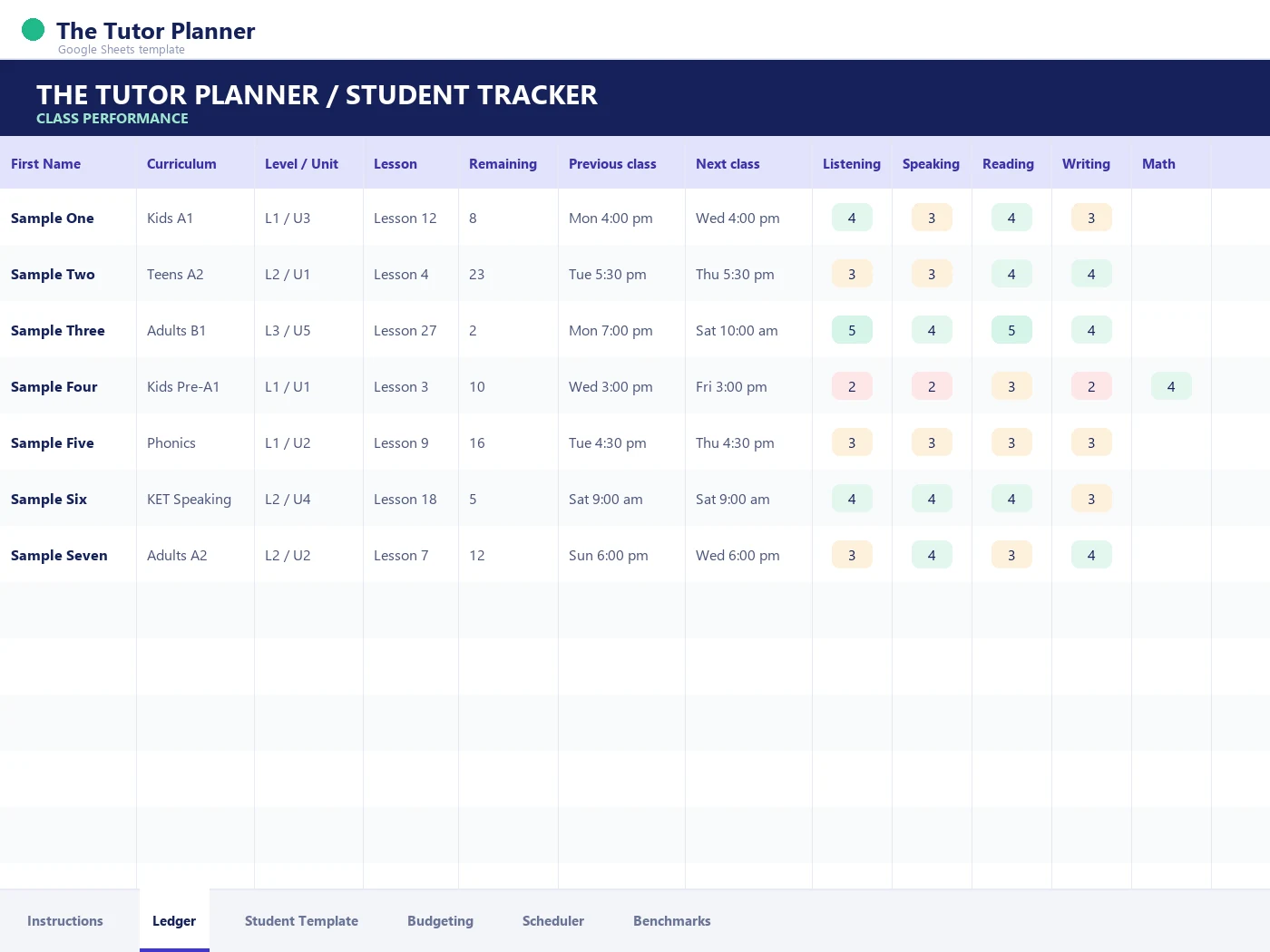
- Class performance tracker. One row per student: curriculum, level and unit, current lesson, classes remaining, previous class and next class, then a score for listening, speaking, reading, writing and math. This is the tab I had open between classes.
- Student information. Name, email and ID, then two kinds of notes side by side: the private ones for me, and the ones written so they could go straight to a parent. Under that, a month-by-month grid of charge, paid and taken, so a package that’s running out shows up before the parent asks.
- Financial goal tracker. Type in a base rate, a goal and a deadline. It works out the classes you need, the classes you’ve done, and the percent of the goal you’ve met, with each month broken down by week.
- Expenses. Curriculum, one-time and monthly. Technical: website, memberships, computer equipment. Physical: props and supplies. Small numbers, but they’re the ones that vanish if you don’t write them down.
- Scheduler. Enter a student’s name and a start and end time, and a script under the ACTIONS menu puts the class on your Google Calendar. The same menu adds a new student tab from a template and clears a tab when a student moves on.
- ESL proficiency benchmarks. Reference sheets by grade band, kindergarten through grade 12, with five levels from Beginning to Extending across listening, speaking, reading and writing. Useful the next time a parent asks what “level 3” actually means.
Before you open it
Three things to know before you make your copy
- It’s a template, so make your own copy. The link I send opens Google’s “make a copy” screen. Your copy is yours: nothing you type comes back to me, and nothing I do to the original changes yours.
- Google will warn you about the scheduler script. The calendar scheduler and the ACTIONS menu run on a small script inside the sheet. The first time you use either, Google shows a screen saying the app isn’t verified. That’s the standard warning for any script that isn’t published in Google’s store, and it’s asking you to trust code that now lives in your own copy. Click Advanced, then the link to continue, then Allow. If you’d rather not, skip the ACTIONS menu. Everything else in the planner works without it.
- It’s from 2021, and it shows. The base rate on the goal tab is $25, the sample dates say 2021, and the expense figures are what I was paying then. Change them to yours on day one. I’m not updating the sheet, because the app is where that work goes now. The formulas don’t care what year it is.
The honest part
What a spreadsheet can’t do, and what I built instead
I want to be straight about this, because I’m giving you the sheet and also selling the thing that replaced it. The sheet worked. It’s how I could teach 70 to 100 classes a week and still know where every student stood. It stopped being enough for three reasons, and none of them was the math.
Every student was a tab. The more students I had, the more tabs I had, and the more I scrolled sideways between classes looking for the right one.
The notes never reached the parent on their own. I wrote them for me. Turning them into something a parent could read was a second job, and it was the one that slipped.
It only knew what I typed. It couldn’t tell me a new student’s level, draft the feedback, or make the homework. Those were the things eating my evenings, and they’re the things I built the app to do.
| The job | In the planner | In The Tutor Resource |
|---|---|---|
| Logging a class | A score in five columns, typed between lessons | A session record across eight skills in under two minutes, with the trend over time |
| Showing a parent progress | Notes you copy into an email | A PDF progress report built from the session logs |
| Placing a new student | A benchmark sheet you read against | An adaptive placement test, 20 to 30 minutes, with a report at the end |
| Knowing what you earned | A goal tab you fill in at the end of the month | Earnings, sessions and effective hourly rate, updated as you teach |
| Adding a student | A script that copies a template tab | A profile with lesson history, payments and schedule in one place |
For a handful of students the sheet is enough. It was for me, for years, and it’s why I’m happy to hand it over rather than sell it.
Questions I get about the planner
Is the ESL teacher planner free?
Yes. You give me an email address, I send the link, you make a copy. There’s no paid version and nothing to buy inside the sheet.
Does it work in Excel?
The tracking tabs do if you download it as an Excel file. The scheduler doesn’t, because it runs on a Google Apps Script that only exists inside Google Sheets.
Do I need The Tutor Resource to use it?
No. The sheet stands on its own and always has. The app is what I moved to when the sheet stopped being enough.
Is it for online tutors or classroom teachers?
I built it as an online tutor with private students, so it thinks in classes and packages rather than periods and semesters. A classroom teacher can use the class tracker and the benchmark sheets and ignore the money tabs.
David Cole is the founder of The Tutor Resource and teaches 70 to 100 online English classes a week. More about David.
When the sheet stops being enough, the app is built for that day
Session logs across eight skills, a placement test with a parent report, and your students, schedule and earnings kept alongside the teaching. The free plan holds three students and doesn’t need a card.